

Mobile Shop Inventory Management Software
Manage new phones, second-hand phones and accessories from one system — IMEI-wise records, purchase and sale price, margins, stock images and bulk uploads, including AI Bulk Upload.
7-day free trial · No credit card needed · See plans
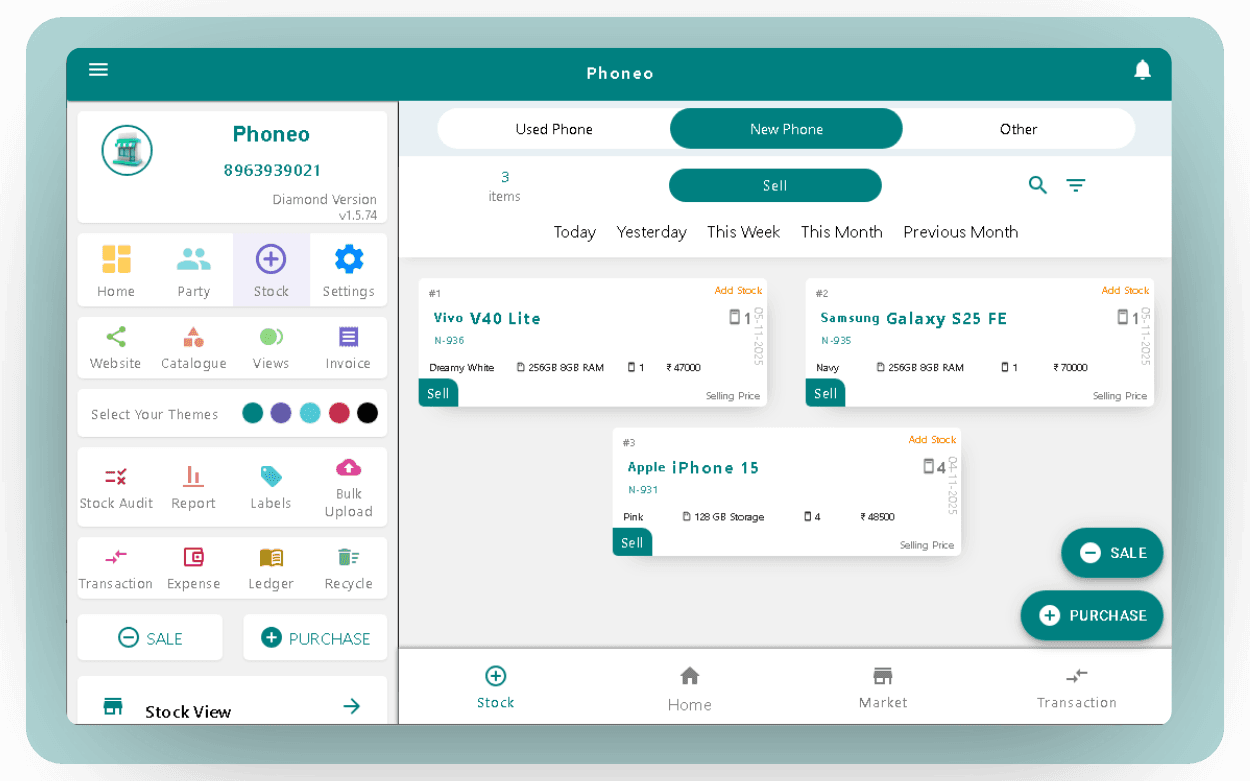
What is mobile shop inventory management software?
Mobile shop inventory management software is a system that records every phone and accessory in your shop — what you bought, what it cost, what it should sell for, and whether it is still on the shelf. In Phoneo each handset is held as its own record with its IMEI, so stock is tracked unit by unit rather than as a loose count of a model.
That matters because a mobile shop is not a general retail shop. Two phones of the same model can have different storage, different condition, a different purchase price and a different margin. Counting them together hides exactly the information you need to price and sell them.
Who is it for?
- Mobile retailers selling new phones
- Second-hand and refurbished phone dealers
- Shops selling accessories alongside handsets
- Multi-branch mobile stores and wholesalers
The problem it solves
A register tells you what you wrote down, not what is actually on the shelf. Purchase prices live in one book, sales in another, and the margin on a specific handset is a mental calculation nobody can repeat a month later.
Excel is better until the file grows. Then IMEIs get typed twice, the copy on the counter laptop drifts from the one on your phone, and adding a fresh supplier list means an evening of manual entry.
What's included
New phone stock
Add brand-new handsets with model, variant, IMEI1 and IMEI2, purchase price and sale price.
Used phone stock
Record second-hand phones with their condition, IMEI, purchase source and the price you paid.
Other items
Accessories, chargers, covers and anything else that is not a handset, tracked in the same system.
IMEI1 / IMEI2, serial and WSN
Identify each unit by its own number so no two handsets are ever confused.
Purchase price, sale price and margin
Keep cost and selling price on the item itself, so margin is a stored fact and not a guess.
Stock images and details
Attach photos and full specification details to a unit, ready for the counter and your online catalog.
Stock history
See what happened to a unit — purchased, sold, restocked or repurchased — instead of reconstructing it.
Bulk upload and AI Bulk Upload
Load a whole supplier list at once, with AI reading files that are not in any fixed format.
AI Pricing
Get buying and selling price guidance on second-hand handsets instead of pricing from memory.
How it works
Add stock
Enter a new phone, a used phone or another item — or upload a supplier file and let Phoneo read it.
Record identity and price
Capture IMEI1/IMEI2 or serial, purchase price, sale price, condition, images and stock details.
Sell from stock
When the unit is billed, it moves out of available stock automatically — no second entry anywhere.
Track and review
Check stock history, restock a returned unit, reverse a purchase, and review what is still sitting unsold.
Features in detail
AI Bulk Upload
AI Bulk Upload is the fastest way to get an existing stock list into Phoneo. Instead of forcing you to rearrange your file into a fixed template first, Phoneo's AI reads the file you already have, works out which column is the model, which is the price and which is the quantity, and converts it into the structure the system needs.
Supported inputs include Excel files, Google Sheets exports and PDFs. If a supplier sends you a list in their own format, you upload it as-is rather than retyping it row by row.
This is the difference between an afternoon of data entry and a few seconds of work — which is why it matters most when you are setting a shop up for the first time, or loading a large purchase.
- Open Bulk Stock Upload in Phoneo.
- Upload your stock file — Excel, Google Sheets export or PDF.
- Phoneo's AI reads the file and detects product names, prices and quantities.
- Review the converted data before it is added.
- Confirm, and the whole list is added to your inventory at once.
- No template to match and no restructuring before upload
- Hundreds of items added in one action instead of one at a time
- Re-upload a newer file later to update stock without redoing setup
- Useful for first-time setup and for large supplier purchases
What is AI Bulk Upload in Phoneo?
AI Bulk Upload lets you add your whole inventory from a file. Phoneo's AI reads the file, understands the data and converts it into the format the system needs, so you do not have to reformat anything first.
Which file formats can I upload?
Excel files, Google Sheets exports and PDFs, along with most common file formats that contain stock data.
Do I need to format my file before uploading?
No. Phoneo AI handles the formatting automatically, so you can upload the file exactly as you received it.
Can I upload a large stock file in one go?
Yes. You can upload multiple products together in a single action rather than entering them one by one.

AI Pricing (AI Mode)
AI Mode is Phoneo's pricing assistant for second-hand handsets. When you take a phone in, it suggests a buying price and a selling price for that model and condition, so the deal is based on data rather than on how the last one went.
Alongside the price, AI Mode indicates how long the handset is likely to take to move and what current demand for it looks like — useful when you are deciding whether to take a trade-in at all.
The suggestion is guidance, not an instruction. You stay in control of the final number; AI Mode exists so that number is an informed one. It is included in your Phoneo subscription at no extra cost.
- Suggested buying price so a trade-in does not turn into a loss
- Suggested selling price aimed at a workable margin
- An indication of how long the handset is likely to sit in stock
- A read on current demand for that model
- Covers the brands Indian shops actually trade in — Apple, Samsung, Xiaomi, Vivo, Oppo, Realme and more
What is AI Pricing in Phoneo?
AI Mode is a pricing engine that suggests how much to buy a used phone for, what to sell it at, and roughly how long it is likely to take to sell, based on the model and its condition.
Does AI Pricing cost extra?
No. AI Mode is included in your Phoneo subscription at no additional charge.
Do I have to accept the suggested price?
No. AI Mode gives guidance — the final buying and selling decision is always yours.
Which brands does AI Pricing cover?
It supports the brands Indian mobile shops commonly deal in, including Apple, Samsung, Xiaomi, Vivo, Oppo and Realme.

New phone stock
New handsets are added with their model and variant, both IMEI numbers, purchase price and sale price. Because the variant is part of the record, a 128 GB unit and a 256 GB unit of the same model stay separate in your stock rather than collapsing into one line.
Used and second-hand phone stock
Second-hand stock carries more detail than new stock, because condition and source both affect what the handset is worth. Phoneo records the IMEI, the condition, the price you paid and who you bought it from, which is also what you need later if there is ever a question about the device.
A sold second-hand phone that comes back can be restocked, and a purchase can be reversed, so the record stays true to what actually happened.
Other items and accessories
Chargers, covers, screen guards, cables and everything else that is not a handset go in as other items. They are managed in the same inventory, so a bill that mixes a phone and two accessories draws from one stock list.
IMEI1, IMEI2, serial and WSN
Every unit is identified by its own number. For handsets that means IMEI1 and, where the device has one, IMEI2; for other stock it means a serial or WSN. This is what makes a warranty check, a return or a dispute a lookup instead of an argument.
Purchase price, sale price and margin
Cost and selling price live on the item itself, so the margin on any individual handset is stored rather than recalculated. When you are deciding whether to discount a unit to move it, you are looking at the real number for that unit — not an average across the model.
Stock images and stock details
Photographs and specification details attach to the stock record. The same details feed your Phoneo catalog and personal website, so a phone you added once is ready to show a customer at the counter and ready to appear online.
Stock history and stock movement
Each unit keeps its own history — when it was purchased, when it was sold, whether it was restocked or the purchase was reversed. A sale updates stock at the moment the bill is raised, so inventory and billing never need reconciling by hand.
How is it different from registers, Excel or WhatsApp?
| Job to be done | Register or Excel | Phoneo |
|---|---|---|
| Find one handset by IMEI | Search by hand | Direct lookup |
| Know the margin on a specific unit | Recalculate it | Stored on the item |
| Add a supplier's stock list | Retype every row | Upload the file, AI reads it |
| Keep stock and bills in step | Two separate entries | One entry, updated together |
| Separate new from used stock | Manual discipline | Separate stock types |
Tutorials & videos
Step-by-step guides for the workflows on this page. Entries marked Video include a tutorial video.
- How to Add Stock in PhoneoVideo
- How to Add New Phone Stock in PhoneoVideo
- How to add second-hand phone stock with IMEIVideo
- How to Add Other Items Stock in PhoneoVideo
- How to Restock Sold Second Hand Phones in PhoneoVideo
- How to Reverse or Repurchase a Sold Phone in PhoneoVideo
- How to bulk upload stock with AI
Frequently asked questions
What is mobile shop inventory management software?
It is software that records every phone and accessory in your shop as its own item — with its IMEI, purchase price, sale price and current status — so you always know what is in stock and what it is worth.
Can Phoneo manage IMEI numbers?
Yes. Each handset is tracked by its own IMEI, including IMEI1 and IMEI2 where the device has both, and other stock can be tracked by serial or WSN.
Can I manage used and new phones separately?
Yes. New phone stock, used phone stock and other items are separate stock types, so second-hand handsets keep their condition and purchase details without being mixed into new stock.
Can I bulk upload stock?
Yes. You can add many products at once by uploading a file instead of entering them one by one.
What is AI Bulk Upload?
AI Bulk Upload lets you upload a stock file in Excel, Google Sheets or PDF form without reformatting it. Phoneo's AI reads the file, identifies the product names, prices and quantities, and converts it into your inventory.
What is AI Pricing?
AI Mode suggests a buying price and a selling price for a second-hand handset, along with an indication of how long it is likely to take to sell. It is included in your subscription and the final decision stays with you.
Can I track stock purchase and sale?
Yes. Each unit keeps a history covering purchase, sale, restock and reversed purchases, and billing a unit removes it from available stock automatically.
Can I add photos and details to my stock?
Yes. Stock images and details can be attached to an item, and the same information can appear on your Phoneo catalog and personal website.
Manage Your Stock with Phoneo
Put every handset, accessory and IMEI into one system — and load your existing stock list with AI Bulk Upload instead of typing it out.