

Mobile Shop Staff Management Software: Manage Staff Salary Without Disputes
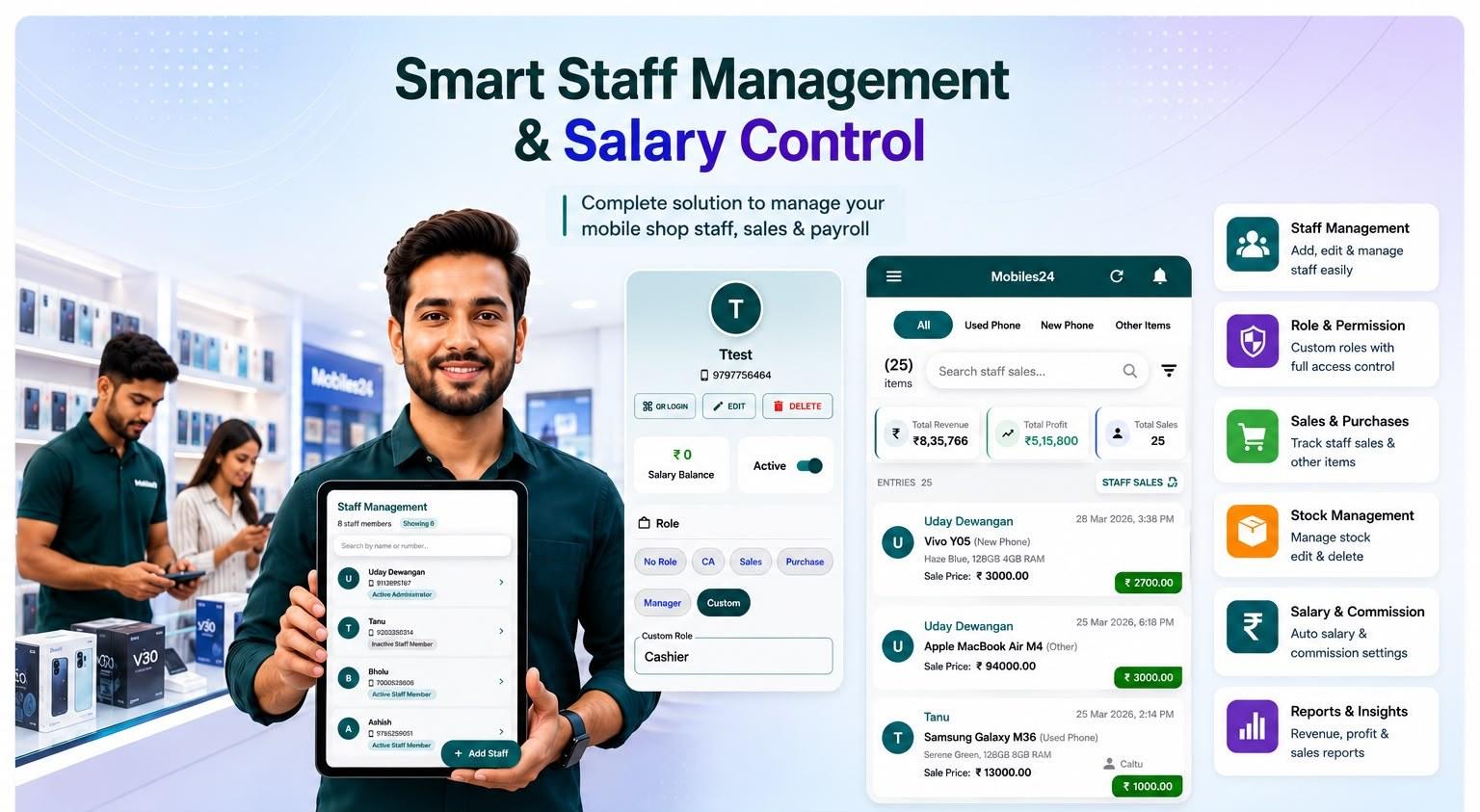
The fastest way to manage mobile shop staff without disputes is simple: give every staff member their own login, set section-wise permissions, and let salary be calculated split-wise from the work they actually handle. That is exactly what Phoneo's mobile shop staff management software does.
In a busy mobile shop, cash moves across counters all day. Staff bill phones, sell accessories, take in repair jobs, and give udhari. Yet at month-end, most owners still calculate salary from memory and gut feeling. That single habit is where almost every staff dispute begins. A clear, system-based record settles the argument before it starts — and saves you hours of stress every single month.
Why staff accountability breaks in a mobile shop
Most mobile shops run on one shared login and a single billing device. Anyone on the floor can create a bill, edit stock, change a price, or add a khata entry — and nobody can tell who did what later.
When the day's cash doesn't match the system, blame becomes the only tool left. Owners start suspecting good staff, staff feel insulted, and trust slowly breaks down. Nobody wins.
Here's what a shared-login setup actually costs you:
- No record of which staff made which sale or edit
- Salary based on memory instead of real work handled
- No limit on who can change prices, stock, or ledgers
- No proof when cash or stock goes missing
- Constant arguments over incentives and targets
The problem usually isn't your staff. The problem is that the system can't tell you the truth.
Signs your shop has a staff salary problem
You don't need an accountant to spot the warning signs. If two or more of these feel familiar, your shop needs proper staff management software:
- You calculate monthly salary from memory or a rough notebook
- You can't say for sure who sold a phone or edited a price
- Staff regularly argue about incentives and targets
- Cash or stock goes missing with no way to trace it
- You're tied to the shop because nobody else can be trusted with full access
Each of these is a small leak. Put together, they cost real money and real peace of mind every month.
How Phoneo manages staff salary and permissions
Phoneo turns a chaotic shared system into a clear, person-by-person record. Here's how each piece works.
- Own login for every staff member. Every person on your team gets their own username and password. The moment they bill, edit, or add a ledger entry, it's tied to their name. No more guessing who did what.
- Section-wise permissions set by the owner. You decide exactly what each staff member can access. A counter salesperson can create bills but cannot change purchase prices, view profit margins, or export your customer ledger. A trusted senior staff member can be given more. You stay in control of sensitive data while your team keeps working smoothly.
- Split-wise salary auto-calculated from real work. Instead of a month-end guess, Phoneo calculates salary split-wise based on the work each staff member actually handled. Sales, targets, and incentives are tied to the person who earned them. The final number is transparent, fair, and easy to defend — so there's nothing left to argue about.
- A full action history for every staff member. Every sale, edit, and ledger entry is attributable. If a price was changed or a bill was cancelled, you can see who did it and when. This audit trail alone stops most internal leakage before it starts.
Together, these features replace gut feeling with proof — and proof is what actually ends disputes.
What permissions should you give each staff member?
Section-wise permissions work best when they match each person's actual role. A simple, safe setup looks like this:
- Counter / sales staff: can create bills and check stock availability, but cannot see purchase prices, profit margins, or edit rates.
- Senior staff / manager: can handle billing, view stock, and manage customer khata, while data export and pricing stay locked.
- Owner: full access — purchase prices, profit reports, ledger exports, and staff settings.
The rule of thumb is simple: give each person exactly what they need to do their job, and nothing more. This keeps your sensitive numbers private, reduces the chance of costly errors, and makes it obvious who is responsible for every action on the system.
Manual register vs staff management software
A paper register or a shared Excel sheet can record numbers, but it can't tie work to a person or stop misuse. Here's the difference at a glance:
| Capability | Manual register | Phoneo staff management |
|---|---|---|
| Per-staff login | No | Yes |
| Permission control by section | No | Yes |
| Salary from actual work | Guesswork | Auto split-wise |
| Action history per staff | No | Yes |
| Tamper-proof record | No | Yes |
| Time spent at month-end | Hours | Minutes |
The register tells you what happened. Staff management software tells you who did it — and that single word is the entire reason disputes disappear.
How to set up staff management in your mobile shop
Getting started takes minutes, not days. Follow these five steps:
- Add each staff member. Create a separate login for every person who works at your counter.
- Assign section-wise permissions. Give billing access to counter staff, and keep purchase, profit, and ledger controls with yourself or a trusted manager.
- Set the salary structure. Define each person's fixed salary plus any incentive or target-based component so Phoneo can calculate it split-wise automatically.
- Track sales daily. Let the system record who sold what and when, tied to each staff login. There's nothing extra to maintain on paper.
- Generate transparent salary at month-end. Open the report, see exactly what each staff member earned, and pay with confidence.
Once it's set up, the system runs quietly in the background and does the math for you — month after month.
Benefits of digital staff salary management
Switching from memory to a system pays off in more ways than one:
- No more salary disputes. Numbers are tied to real work, so there's nothing to argue about.
- Hours saved every month. Salary that took a full evening now takes a few minutes.
- Less cash and stock leakage. A visible audit trail discourages misuse before it happens.
- More motivated staff. Fair, transparent incentives push your team to sell more.
- Freedom for the owner. You can step away from the shop knowing sensitive controls are locked down.
- Ready to scale. Add new counters, staff, or even a second branch without losing track.
Good staff management isn't just about catching mistakes — it's about building a shop your team trusts and you can grow.
Common mistakes mobile shop owners make
Even experienced owners fall into these traps. Avoid them:
- Sharing one login with the whole team — it erases all accountability instantly.
- Giving everyone full access — counter staff rarely need to see profit margins or purchase prices.
- Calculating salary on gut feeling — it feels faster but creates monthly friction.
- Not disabling a login when a staff member leaves — old access left open is a real security risk.
- Never reviewing reports — the data is useless if you don't actually check it.
Fixing even one of these will make your shop calmer and your month-end cleaner.
Why trust Phoneo for mobile shop staff management
Phoneo is built by a team that works only with Indian mobile retailers — not a general accounting tool bent to fit a phone shop. Every staff feature here comes from watching real counters run: shared logins that erase accountability, salary calculated from memory, and the month-end arguments that follow.
That focus is why 4,300+ mobile shops already run their billing, stock, khata and staff management on Phoneo. The staff tools — employee logins, section-wise permissions, split-wise salary and a per-person activity trail — exist because shop owners asked for a way to prove who did what, not guess.
This guide is written and maintained by the Phoneo product team and updated as the staff management software evolves — so what you read here reflects how the app actually works today.
Frequently asked questions
Can each staff member have their own login in Phoneo?
Yes. Every staff member gets their own login, and the owner sets section-wise permissions to control exactly what each person can see and do.
How is staff salary calculated in Phoneo?
Salary is auto-calculated split-wise based on the work each staff member handled — including sales and incentives — so month-end numbers are transparent and dispute-free.
Can I limit what my staff can access?
Absolutely. You can let a staff member bill customers while blocking access to purchase prices, profit margins, customer ledgers, and data exports. You decide section by section.
Can I use Phoneo for multiple counters or branches?
Yes. You can manage several staff members across multiple counters or shops, each with their own login and permissions, all from one place.
What happens to my data if a staff member leaves?
Your data stays safe with you. You can disable that staff member's login instantly, and their past activity remains recorded in the audit history.
Run your mobile shop on Phoneo
4,300+ mobile shops already manage staff, billing, stock, and khata in one place. Give every staff member their own login, set section-wise permissions, and calculate salary split-wise — without a single dispute.
Start free — no credit card needed.
See the full Phoneo feature list or pricing from ₹99/month.