

Mobile Repair Shop Software: How Job Cards, Billing, Inventory and Customer Management Turn a Local Shop Into a Professional Business
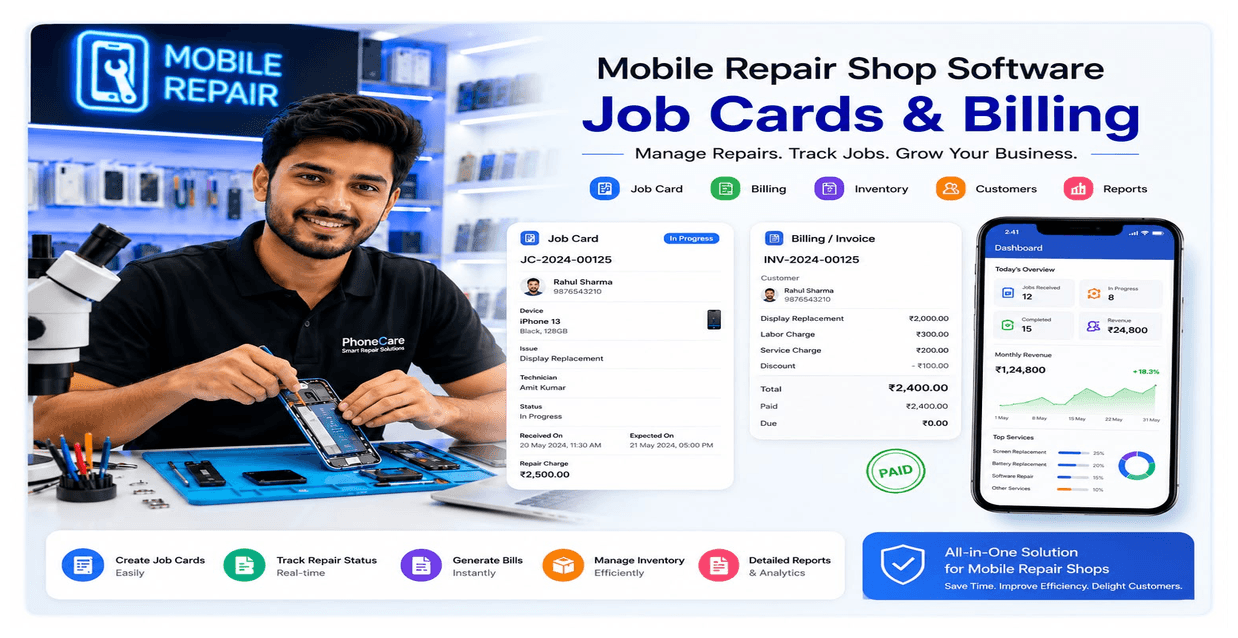
Picture a Monday morning at a busy mobile repair shop. Six phones are lying on the counter, two customers are asking “kab tak hoga” (when will it be ready), the technician remembers three job details in his head, and the owner is flipping through a register looking for yesterday's payment entry. By evening, one spare part is missing from stock, one customer complains the price quoted was different, and nobody is sure who actually collected the advance payment.
This isn't a one-off bad day — it's what running a mobile repair shop on paper registers, WhatsApp chats, and memory looks like every single day, for thousands of shop owners across India. The problem isn't effort; repair shop owners work incredibly hard. The problem is that a manual system simply cannot keep up once a shop crosses a certain size — more customers, more staff, more parts, and more moving pieces than any notebook can track reliably.
This is exactly where mobile repair shop software changes the game. It doesn't just digitise a register — it replaces five broken systems (job tracking, billing, inventory, customer records, and staff accountability) with one connected workflow. This guide breaks down exactly what this kind of software does, why it matters in 2026, and how to choose the right one for your shop.
What is mobile repair shop software?
Mobile repair shop software is a digital system built specifically for phone repair and service businesses. It combines job card creation, billing (GST and non-GST), spare parts inventory, customer history, and staff performance tracking into a single app — usually accessible from a phone, tablet, or computer.
Think of it as the operating system for your repair counter. Instead of a paper slip for the job, a separate notebook for accounts, and a mental note for stock, everything lives in one place and updates in real time. When a technician marks a repair “completed,” the software already knows which parts were used, what the customer owes, and when to send a pickup reminder.
Unlike generic billing apps meant for retail sales, a proper repair management system is designed around the actual lifecycle of a repair job: intake → diagnosis → parts used → repair → quality check → billing → pickup. That lifecycle is very different from a simple sell-and-print-receipt flow, which is why repair-specific software exists at all.
Common problems mobile repair shops face without software
Most shop owners don't realise how much money and trust they're losing to small, repeated mistakes. Here are the patterns that show up again and again in offline mobile repair businesses:
- Lost job cards — a handwritten slip gets misplaced, and nobody remembers what issue was reported or what price was quoted.
- Manual registers — entries pile up, handwriting gets messy, and end-of-month reconciliation becomes a nightmare.
- Missing customer history — a repeat customer walks in, and staff has no record of their last repair, warranty, or preferences.
- Inventory confusion — nobody knows exactly how many display panels, batteries, or charging ports are left in stock until a customer is standing there and the part isn't available.
- Wrong billing — a technician quotes one price verbally, but the final bill (if made at all) doesn't match, creating disputes.
- Delayed delivery — jobs get stuck because nobody is tracking which repair is due, overdue, or waiting on a part.
- Staff mistakes — with no accountability trail, it's hard to know which technician handled which job, or whether a part was actually used or pocketed.
- Payment tracking problems — partial payments, advances, and pending balances get lost between cash, UPI, and memory.
Pro tip: If you've ever had to tell a customer “thoda check karke batata hoon” about their own repair status, that's a signal your shop needs a digital system — not more effort from your staff.
Benefits of mobile repair shop software
Every job is tracked from start to finish
No more guessing which phone is where. A job moves through clear stages — received, in diagnosis, parts ordered, under repair, ready for pickup — and anyone on staff can check the status instantly.
Billing becomes instant and error-free
The price quoted at intake becomes the final bill automatically, with parts and labor added transparently. No manual recalculation, no mismatched numbers.
Inventory updates itself
When a part is used in a repair, it's deducted from stock automatically. You always know what you have — and what you're about to run out of.
Customers come back more often
A saved customer database means every visit builds on the last one. You can recall someone's device history in seconds, which builds trust and encourages repeat business.
Staff accountability improves
Every job card is linked to the technician who handled it. If something goes wrong, you know exactly where to look — and staff naturally become more careful when their work is on record.
You get real business insights
Instead of guessing whether the shop made a profit this month, you can see daily sales, repair volume, and inventory value at a glance.
Example: A shop repairing 15–20 phones daily typically loses 2–4 hours a day just searching for information — job details, part stock, or customer numbers. Digitising that workflow reclaims those hours for actual repair work or sales.
Job card management
What is a job card?
A job card is the digital record of a single repair — it captures the customer's name and number, the device model, IMEI number, the reported problem, the estimated cost, and the technician assigned to the job.
How it works
When a customer drops off a phone, staff creates a job card in seconds — no handwriting, no duplicate slips. The card is time-stamped, assigned a unique job number, and linked directly to that customer's profile.
Why it matters
A well-maintained job card system means nothing is ever “somewhere in the shop, I'll find it.” Every repair has a clear owner, a clear status, and a clear (digital) paper trail.
A real repair example
A customer brings in a phone with a cracked screen and a charging issue. The job card records both problems, the IMEI (crucial for identifying the exact device later), and an estimate. Midway through, the technician discovers the battery also needs replacing — this gets added to the same job card, so the final bill reflects the actual work done, and the customer sees a transparent breakdown instead of a surprise charge.
Benefits
- No lost or duplicate job slips
- Clear technician assignment
- Full repair history tied to the device (via IMEI) and the customer
- Faster handovers between shifts or staff members
Transferring a repair job between shops
Repair shops don't always work in isolation. Sometimes a shop takes in a repair it can't fully handle itself — maybe a specific spare part isn't in stock, or the issue needs a technician with a different specialisation who sits at another shop. In the offline world, this usually means a phone call, a manual note, and a lot of hoping that nothing gets lost in translation between the two shops.
Phoneo solves this with job transfer between shops. If a shop using Phoneo's repair system creates a job card, it can transfer that job directly to another shop that also uses Phoneo's repair system — without re-entering the device details, customer information, or reported issue from scratch.
How it works
- Shop A creates a job card as usual — device, IMEI, customer details, and reported issue.
- If Shop A decides the repair needs to move to Shop B (another Phoneo user), the job is transferred digitally, carrying all existing job card information with it.
- Shop B now handles the repair and updates the status as work progresses — diagnosis, parts used, completion, and so on.
- Even though Shop B is doing the actual repair work, Shop A can still monitor the job in real time, seeing every status update Shop B makes.
Why it matters
This means the originating shop never loses visibility over a job just because the physical work is happening somewhere else. The customer relationship stays with Shop A — they can confidently tell the customer exactly where the repair stands, even though the phone itself is sitting at Shop B's counter.
A real scenario
A customer walks into Shop A with a motherboard-level fault that Shop A's technician isn't confident handling. Instead of turning the customer away or making a vague promise, Shop A creates the job card and transfers it to Shop B, a partner shop with the right expertise, using Phoneo. Shop B updates the status as they diagnose and repair the device. Throughout this process, Shop A can check the live status on their own Phoneo dashboard and update the customer accordingly — no phone calls back and forth needed to “check with the other shop.”
Benefits
- No duplicate data entry when a job moves between shops
- The transferring shop retains full visibility into repair progress
- Builds trust between partner shops, since nothing depends on informal updates
- Customers get accurate status updates even when the repair isn't happening on-site
Pro tip: This feature is especially useful for shop owners who run informal repair networks or referral arrangements with other local shops — it turns an ad-hoc, trust-based handoff into a tracked, transparent one.
Billing management
Billing is where a repair job becomes revenue — and where most manual systems fall apart.
- GST billing. For shops that are GST-registered, the software generates compliant GST invoices automatically, applying the correct tax breakdown without manual calculation.
- Non-GST billing. Smaller shops or those below the GST threshold can generate simple, professional non-GST invoices just as easily.
- Digital invoices. Every bill is stored digitally, so you're never dependent on a physical copy that could be lost or damaged.
- Payment history. Partial payments, advances, and dues are tracked against each job — so you always know exactly what a customer owes.
- WhatsApp invoice. Instead of printing and handing over a paper bill, the invoice can be shared directly on WhatsApp — faster for the customer and one less printing cost for you.
- Professional image. A clean, digital, GST-compliant invoice signals credibility. Customers trust a shop that hands them a proper bill far more than one that scribbles a number on a torn paper.
| Billing method | Manual register | Repair shop software |
|---|---|---|
| Speed | Slow, handwritten | Instant, auto-filled |
| Accuracy | Prone to calculation errors | Auto-calculated |
| GST compliance | Manual, error-prone | Automatic |
| Record storage | Physical, can be lost | Cloud-backed |
| Customer trust | Lower | Higher |
Inventory management
Spare parts and accessories
Every display, battery, charging port, and back panel in your shop can be tracked individually — quantity, cost price, and selling price all recorded.
Stock alerts
The software can flag when a part is running low, so you reorder before you're stuck mid-repair without a critical component.
Profit tracking
Because purchase price and selling price are both recorded, you can see your actual margin on every part used — not just guess at it.
Purchase history
A full record of what you bought, from which supplier, and when — useful for negotiating better rates and spotting price trends.
Common inventory mistakes
- Not recording parts used in a repair, leading to phantom stock that “should” be there but isn't
- Buying in bulk without tracking which parts actually move fast
- No visibility into slow-moving stock tying up cash
Example: A shop stocking 40 different screen models can lose track of which ones are moving and which are gathering dust. With inventory software, the owner can instantly see that a particular screen model hasn't sold in three months — and stop reordering it.
Customer management
Customer database
Every customer who has ever visited your shop is saved — name, number, devices owned, and repair history — searchable in seconds.
Repair history
When a returning customer mentions “meri screen phir se kharab ho gayi,” you can pull up exactly what was done last time, when, and by whom.
Repeat customers
Shops that maintain customer history naturally see more repeat visits — people trust a shop that remembers them and their device.
Warranty tracking
Repairs often come with a warranty period. The software can track this automatically, so disputes about “yeh toh warranty mein tha” are resolved with actual records, not arguments.
Follow-up reminders
Automated reminders for pickup, warranty expiry, or even routine servicing keep customers engaged without manual follow-up effort.
Customer trust
All of this compounds into something simple but powerful: trust. A shop that remembers you, has your history on record, and gives you a proper bill feels more professional — and professional shops get recommended.
Staff management for repair jobs
Staff performance
See how many jobs each technician completes, how long repairs typically take, and where bottlenecks happen.
Work assignment
Assign incoming jobs to specific technicians based on workload or specialisation, instead of relying on whoever happens to be free.
Repair status visibility
Every staff member can see the live status of any job — no need to ask around the shop floor.
Accountability
Since every job card is linked to a technician, quality issues or repeat complaints can be traced back and addressed directly, rather than becoming a shop-wide blame game.
Reports and analytics
Numbers you can actually use, without spending an evening with a calculator:
- Daily sales — know exactly what came in today, across cash, UPI, and card.
- Monthly profit — see real margins after accounting for parts cost and expenses.
- Inventory reports — current stock value, fast-moving vs. slow-moving parts.
- Repair reports — job volume, average repair time, most common issues.
- Business insights — patterns that help you make decisions, like which repair type is most profitable or which technician needs support.
Without reports, you're running a business on gut feeling. With reports, every decision — restocking, staffing, pricing — is based on actual data from your own shop.
Why every mobile repair shop needs software in 2026
India's retail and service sector is moving digital faster than ever, and mobile repair is no exception. A few clear trends are pushing this shift:
- Digital India momentum — UPI, digital invoicing, and online records are now the default expectation, not a bonus feature.
- Rising competition — with more repair shops opening in every locality, the ones offering a professional, transparent experience win customer loyalty.
- Changing customer expectations — today's customers, especially younger ones, expect a proper bill, a status update, and a trackable service — the same experience they get from large service chains.
- GST and compliance pressure — as scrutiny around billing and tax compliance increases, having automated, accurate invoicing isn't optional anymore.
Shops that adopt this shift early aren't just avoiding problems — they're positioning themselves as the more trustworthy option in their market.
How to choose the best mobile repair shop software
Not all software is built the same. Before you commit, evaluate on these points:
- Ease of use — your staff should be able to learn it in a day, not a week. Complicated software just becomes another paper register that nobody updates.
- Cloud storage — your data should be safe even if your phone or computer is lost or damaged.
- Data security — customer information and financial records need proper protection.
- Support — when something goes wrong on a busy day, you need quick help, ideally in a language and format (like WhatsApp) you're comfortable with.
- Pricing — the cost should make sense for a small or growing shop, not just enterprise-level businesses.
- Features — job cards, billing, inventory, and customer management should all work together, not as disconnected modules.
- Updates — software should keep improving, adding features based on how real shops actually use it.
- Scalability — as you grow (more staff, more branches), the software should grow with you, not force you to switch systems later.
Common mistake: Many shop owners pick software based only on the lowest price, then discover it can't handle GST billing properly or doesn't support their specific repair workflow. Evaluate on fit first, price second.
Why Phoneo is a smart choice
If you're looking for a system built specifically for how Indian mobile shops actually operate — selling new and second-hand phones, running repairs, and managing accessories all under one roof — Phoneo is worth a close look.
Phoneo brings together job card management, GST and non-GST billing, inventory tracking, customer management, staff management, and business reports into a single, connected app. A repair job created at intake stays linked all the way through to billing and inventory, so parts used in a repair are automatically reflected in stock, and the final invoice matches the actual work done.
Beyond the core repair workflow, Phoneo also gives shops cloud backup (so records are never dependent on a single device), a personal website for the business, and an interface designed to be simple enough for staff to pick up quickly. Thousands of mobile shops across India already run their day-to-day operations on it — from a single-counter shop to multi-branch setups.
The point isn't that any one feature is unique — it's that everything works together as one system, instead of five separate tools that don't talk to each other.
Why trust this guide
This guide is written and maintained by the Phoneo product team, who work directly with Indian mobile repair and retail shops every day — not a general software vendor guessing at what a repair counter needs.
Every workflow described here — job cards, job transfer between shops, GST billing, inventory, and staff accountability — reflects how Phoneo's repair management system actually works today, not a theoretical feature list.
This article is reviewed and updated as the Phoneo repair workflow evolves, so what you read here matches the live product.
Conclusion
Running a mobile repair shop on paper registers and memory might work when you're small — but every growing shop eventually hits a wall where manual tracking simply can't keep up. Lost job cards, mismatched bills, confused inventory, and forgotten customer history aren't just inconveniences — they're quiet, ongoing losses to your revenue and reputation.
Mobile repair shop software solves this by connecting job cards, billing, inventory, and customer management into one reliable system — giving you back time, reducing errors, and making your shop look and run like a professional operation.
The shift to digital isn't coming for repair shops — it's already here. The only real question is whether you make the move now, while it's a choice, or later, once competitors who already did have pulled ahead.
Frequently asked questions
What is mobile repair shop software?
It's a digital system that manages job cards, billing, inventory, and customer records for phone repair shops in one connected app, replacing paper registers and manual tracking.
Is mobile repair shop software useful for small repair shops?
Yes. It helps small shops avoid billing errors and lost parts while building customer trust through professional, organised service — even on a tight budget.
How does a job card work?
A job card records the device, IMEI, issue, and cost estimate at intake, tracks status through the repair, and converts directly into a bill once the job is completed.
Can the software create GST invoices?
Yes. It generates GST-compliant invoices automatically with the correct tax calculation, and also supports simple non-GST invoices for smaller shops.
Can it manage spare parts inventory?
Yes. It tracks spare parts and accessories, auto-deducts stock used in each repair, and alerts you when inventory is running low.
Can I track repair status in real time?
Yes. Every job shows a live status — received, in diagnosis, under repair, ready for pickup — visible to staff instantly.
Is the software easy for staff to use?
Yes, it's simple enough for technicians and counter staff to learn with minimal training, while every action stays linked to the staff member who performed it.
Is customer repair history saved?
Yes. Customer contact details, device history, and past repairs are stored and instantly searchable on every visit.
How secure is the data stored in the cloud?
Data is stored on secure cloud servers with automatic backups, so records stay safe even if a shop device is lost or damaged.
How much does mobile repair shop software cost?
Pricing varies by provider, but most repair-focused platforms are affordable, often starting as a low monthly subscription rather than a large upfront cost.
Which is the best mobile repair software in India?
It depends on a shop's needs, but Phoneo suits Indian mobile shops well by combining repairs, sales, inventory, staff and customer management in one app, starting at ₹99/month with a 7-day free trial.
Run your mobile shop on Phoneo
4,300+ mobile shops already manage staff, billing, stock, and khata in one place. Give every staff member their own login, set section-wise permissions, and calculate salary split-wise — without a single dispute.
Start free — no credit card needed.
See the full Phoneo feature list or pricing from ₹99/month.